Moultrie
4.44.41KReviews
Analysis ByAppCompare
Ever stumbled upon an app that makes you wonder how you ever managed without it? Let me introduce you to Moultrie, an app that’s truly a gem for outdoor enthusiasts and wildlife photographers. If you love capturing the beauty of nature or keeping an eye on wildlife activities, this app is going to be your new best friend.
Getting Started with Moultrie
First things first, setting up Moultrie is a breeze. You know how some apps have you jumping through hoops just to get started? Not this one. After downloading from the app store, you’ll be prompted to create an account. Once you’re in, the interface is clean and intuitive. Even if you’re not tech-savvy, navigating the app feels like second nature.
Features that Make a Difference
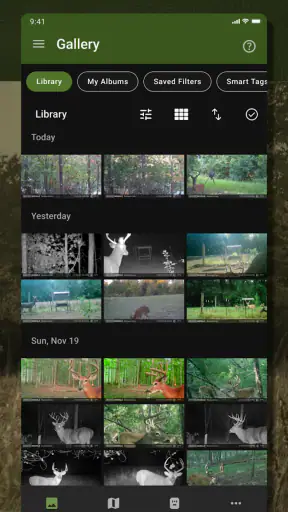
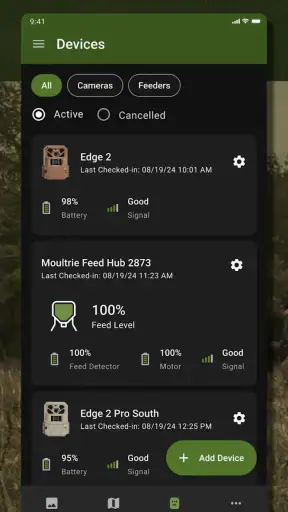
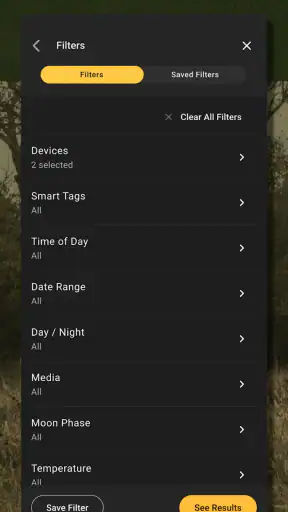
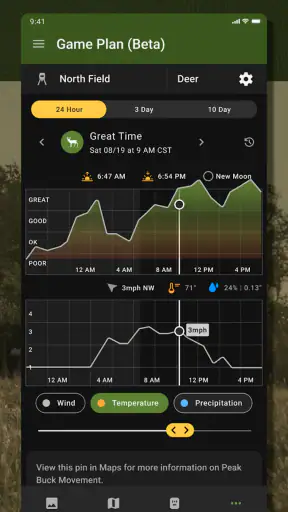
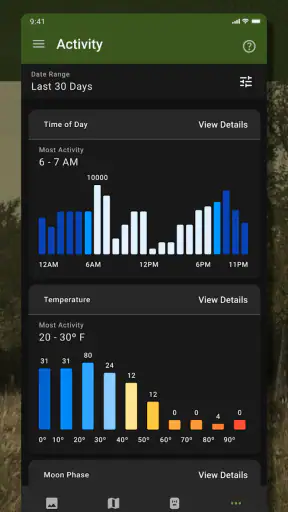
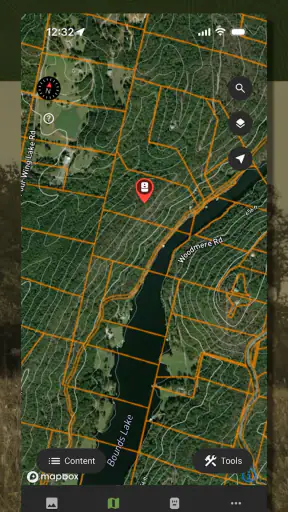
What really sets Moultrie apart is its range of features designed specifically for wildlife monitoring. You can connect your Moultrie camera to the app, which is super convenient. Imagine being able to adjust camera settings right from your phone! There’s a feature to view and manage images and videos, so you can easily keep track of what’s happening in the wild.
One of my favorite features is the ability to receive real-time alerts. Let’s say you’re waiting to catch sight of a rare bird. Instead of checking the camera every hour, you get notified the moment there’s movement. It’s like having a personal assistant keeping an eye on things for you.
User Experience and Interface
The user interface is something I can’t stop raving about. It’s straightforward, yet sophisticated enough to offer all the functionalities you need. The images load quickly, and you can zoom in without losing clarity. This is crucial when you’re trying to spot details in wildlife photography.
Another aspect worth mentioning is the app’s performance. It’s smooth and doesn’t lag, which is something I really appreciate. No one wants to miss a perfect shot because the app decided to freeze at the wrong moment.
Connectivity and Compatibility
In terms of connectivity, Moultrie doesn’t disappoint. It seamlessly connects to various Moultrie cameras, ensuring you’re always in sync. The app supports both Android and iOS, so no one gets left out. Plus, the regular updates mean you’re always getting the latest features and improvements.
One thing I noticed is the ease of syncing data across devices. Whether you’re using a tablet or switching from your phone, the continuity is impressive. It’s little things like these that make a big difference in user satisfaction.
Why You’ll Love It
There’s something incredibly satisfying about being able to manage your wildlife camera setup from the palm of your hand. And the fact that Moultrie makes this possible with such ease is a game-changer. Whether you're a seasoned wildlife photographer or just someone who loves the outdoors, this app offers a seamless way to enhance your experience.
From its intuitive design to the powerful features, Moultrie is designed with the user in mind. It’s not just about capturing images; it’s about creating an experience that’s engaging and rewarding. Trust me, once you start using it, you’ll wonder how you ever managed without it.
So, if you’re ready to take your wildlife observation to the next level, give Moultrie a try. It’s an app that not only meets expectations but exceeds them. Happy exploring!
FAQ
What is the primary function of the Moultrie app?
The Moultrie app is designed to manage and monitor your Moultrie trail cameras remotely. It allows users to view and organize images and videos captured by their cameras, adjust camera settings, and receive real-time alerts. This app is essential for wildlife enthusiasts and hunters who want to keep track of animal activity without physically checking the cameras.
Is the Moultrie app compatible with all Moultrie camera models?
The Moultrie app is compatible with most recent models of Moultrie trail cameras. However, it's important to check the specific model compatibility on the app's official website or the camera's user manual. Older models may not support all features offered by the app, so verifying compatibility is crucial before downloading.
Can I access the Moultrie app on both Android and iOS devices?
Yes, the Moultrie app is available for both Android and iOS devices. You can download it from the Google Play Store for Android devices and the Apple App Store for iOS devices. Ensure your device meets the minimum system requirements for optimal app performance and functionality.
Does the Moultrie app require a subscription or any additional fees?
While the Moultrie app itself is free to download, certain features may require a subscription or additional fees. For instance, cloud storage options and advanced data plans might have costs associated. It's advisable to review the app's pricing details and subscription plans before committing to any in-app purchases.
How secure is the data stored and shared via the Moultrie app?
The Moultrie app prioritizes user data security by employing encryption protocols for data storage and transmission. Users can expect their images, videos, and personal information to be protected. However, it's always good practice to review the app’s privacy policy and ensure your account settings are optimized for security.
Pros
- User-friendly interface for easy navigation.
- Comprehensive wildlife tracking features.
- High-quality image and video capture.
- Reliable connectivity with cellular networks.
- Wide range of customizable settings.
Cons
- Limited cloud storage options.
- Subscription required for advanced features.
- Battery life could be improved.
- Occasional app crashes reported.
- Initial setup can be time-consuming.